One of the most important decisions at the beginning of any project is understanding how to choose hosting for WordPress in the right way, so the website works with good speed, stability, and without unnecessary technical problems. Many people look only at the price, but in practice good hosting affects not just cost, but also performance, security, SEO, and website management.
If you choose the wrong option, you may end up with a slow website, frequent downtime, installation difficulties, and limitations as the project grows. That is why hosting is not just a technical detail, but a core foundation for the future of the website. And if you want to better understand the broader context of the platform, it is also worth reading the main guide on WordPress Website Creation.
In this article, we will look at how to choose hosting for WordPress, which factors really matter, and which mistakes you should avoid.
Why is hosting so important for a WordPress website?
Hosting is the environment where your website operates. It affects how quickly pages load, how stable the website is, and how easy it is to manage the project on a daily basis.
Even if you have a good design, strong content, and well-chosen plugins, poor WordPress hosting can weaken the whole result. It affects:
- loading speed;
- website availability;
- security;
- ease of WordPress installation and updates;
- theme and plugin stability;
- SEO performance;
- project growth potential.
That is why the question how to choose hosting for WordPress is directly connected to the overall quality of the website.
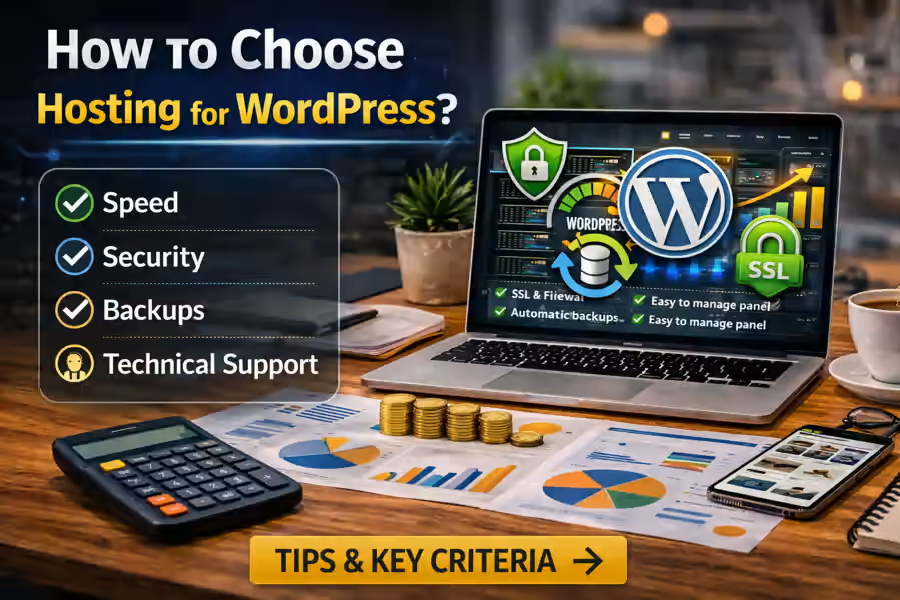
How to choose hosting for WordPress: key criteria
To make a good decision, it is important to look at several factors, not just the price.
1. Speed and performance
If you are looking for fast hosting for WordPress, one of the first things to check is server performance. Slow hosting hurts user experience and can also negatively affect visibility on Google.
It is worth checking whether the service offers:
- SSD or NVMe storage;
- modern PHP versions;
- solid server optimization;
- caching;
- stable database performance.
The better the performance, the easier it is to build a fast and competitive website.
2. WordPress-specific support
Not every hosting service is equally good for WordPress. Ideally, you should choose a solution with clear support for this platform.
Good hosting for WordPress should offer:
- one-click WordPress installation;
- automatic updates;
- a WordPress-optimized environment;
- support for common themes and plugins;
- an easy management panel.
If you are just starting out, this makes the whole process much easier.
3. Stability and uptime
Your website should be available as much as possible. If hosting goes down frequently, that hurts the user experience, the business, and SEO as well.
Before choosing, check:
- the promised uptime;
- the company’s reputation;
- client reviews;
- overall service stability.
Even a well-designed website loses value if it is regularly unavailable.
4. Security
Security should be taken seriously from the start. Good WordPress hosting with SSL and basic protection already helps prevent many problems.
Ideally, the service should include:
- a free SSL certificate;
- protection against malicious activity;
- automatic backups;
- server-level security measures;
- fast website recovery options.
This is especially important for business websites, blogs, and online stores.
5. Backups
Backups are essential. A good backup system allows you to restore the website in case of an error, failed update, technical problem, or attack.
It is best if the hosting includes:
- automatic backups;
- multiple saved copies;
- simple restoration;
- safe backup storage.
Many people think about backups only after something goes wrong. It is much better to plan this from the start.
6. Ease of the control panel
If you do not want to spend a lot of time on technical details, choose a service with an intuitive control panel.
It should be easy to:
- connect your domain;
- install WordPress;
- create email accounts;
- manage SSL;
- create backups;
- access files and databases.
A clear interface makes launching a website much easier.
7. Technical support
Even in a small project, questions will come up. That is why technical support is an important factor.
It is best if support:
- responds quickly;
- understands WordPress;
- helps with installation and setup;
- is available at practical times.
If you are deciding which hosting is best for WordPress, support quality should matter a lot.
What type of hosting should you choose for WordPress?
Not every project needs the same type of hosting. The choice depends on the size of the website and its goals.
Shared hosting
It is suitable for:
- small websites;
- blogs;
- simple business websites;
- early-stage projects.
It is the most affordable option, but it should still be a quality service.
VPS or cloud hosting
It is suitable for:
- more demanding projects;
- growing websites;
- business websites with more traffic;
- online stores.
It gives more control and more resources, although it usually requires a bit more technical knowledge.
Managed WordPress Hosting
This is a solution designed specifically for WordPress. In many cases, it is very practical because part of the technical setup is already prepared.
What else should you check when choosing hosting?
When thinking about how to choose hosting for WordPress, it is also useful to pay attention to additional details.
Limits and restrictions
Sometimes a cheap plan looks attractive, but includes limits on:
- memory;
- traffic;
- number of websites;
- number of databases;
- performance;
- backups.
That is why you should not look only at the price. Check what the plan actually includes.
Scalability
If the website grows, the hosting should allow you to move to a higher plan without a complicated migration.
Server location
The closer the server is to your target audience, the better loading speed may be. For local projects, this can have a real impact.
How to choose hosting for WordPress for a business website?
When the website is for a business, the requirements become more serious. Here, you need to think not only about launch, but also about the future.
For a business project, it is especially important to have:
- stability;
- strong speed;
- security;
- technical support;
- room for growth;
- good compatibility with WordPress.
If the website is meant to attract clients, build trust, and support a digital strategy, it is usually not worth choosing only by the lowest price. And if you are also evaluating the total website budget, you can connect this article with How Much Does a WordPress Website Cost.
Common mistakes when choosing hosting
When people try to find the best hosting for WordPress, they often repeat the same mistakes.
Choosing only by price
The cheapest option is not always the best one. A slow or unstable service may cost more in the future.
Ignoring technical features
It is important to look at the real server resources, not just the marketing message.
Not planning for growth
If the project evolves, the hosting should be able to handle that growth.
Forgetting WordPress compatibility
Not every hosting service is equally convenient for this platform.
Not securing SSL and backups
These are basic elements that should be included from the beginning.
To understand other common startup problems, it can also help to read Mistakes When Creating a WordPress Website.
Is hosting connected to the theme and plugins?
Yes, very much. Even a good theme and useful plugins can perform worse on weak hosting.
If you are still building the website structure, it also makes sense to read:
Hosting, theme, plugins, and website structure should all work together.
Is it worth choosing expensive hosting right away?
Not always. For a simple project, a good basic plan may be enough. What matters is that it is suitable hosting for WordPress and allows you to grow later.
The best choice is not always the most expensive one, but the one that:
- works reliably;
- supports WordPress properly;
- offers good speed;
- includes backups and SSL;
- allows upgrades to stronger plans later.
Conclusion
Understanding how to choose hosting for WordPress helps you avoid many problems before the website is even launched. Good hosting is not just a place to store files, but a technical foundation that affects speed, security, management, and long-term growth potential.
If you make this choice carefully, you will create a much stronger base for your website. And for a more complete understanding of everything the platform can offer, this page should be linked to the main content about WordPress Website Creation.